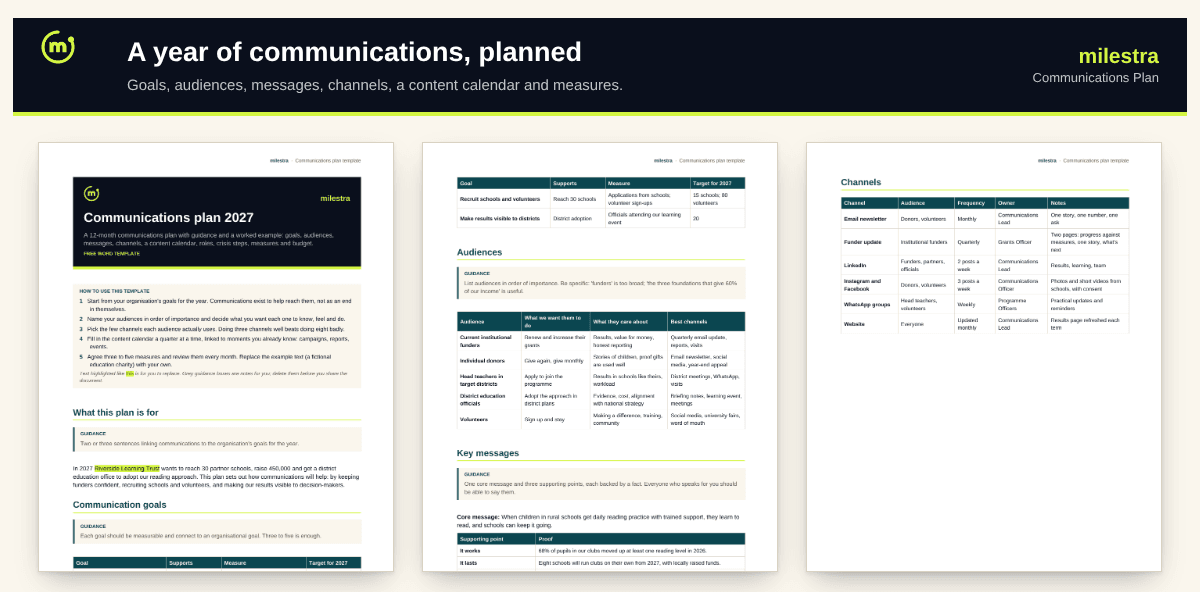
Free communications plan template: a year of communications on a few pages
Communications work best when they serve the organisation's goals rather than fill a posting schedule. This template takes you from goals and audiences to messages, channels and a 12-month content calendar, with roles, consent rules, crisis steps, measures and a budget, all with a worked example.
Word · 6 pages
Communications plan template
Goals, audiences, messages, channels, a 12-month calendar, crisis steps, measures and budget.
Goals linked to the organisation's goals
Audiences with what you want each to do
12-month content calendar by moment
Crisis steps, measures and budget
Free · Opens in Word and Google Docs · Sent to your inbox
What's inside
Section
What it does
Goals and audiences
Communication goals with measures and targets; audiences in order of importance, what they care about and where to reach them.
Messages and channels
A core message with three supporting points and proof; each channel's audience, frequency and owner.
Content calendar
Twelve months anchored to campaigns, reports and events.
Roles, consent and crisis
Who does what, rules for photos and stories, and six steps for when something goes wrong.
Measures and budget
Baselines and targets reviewed monthly or quarterly, and the year's costs.
How to use it well
Start from organisational goals. Each communication goal should help one of them.
Be specific about audiences. 'Funders' is too broad; 'the three foundations giving most of our income' is useful.
Agree one core message. Everyone who speaks for you should be able to say it, with one fact behind each point.
Choose fewer channels. Three done well beat eight done badly.
Plan a quarter in detail. Outline the rest of the year around moments you already know about.
Review measures monthly. Drop what isn't working and do more of what is.
Skip the spreadsheet
Report results without the scramble
In Milestra your goals, results and stories sit in one place, so funder updates and the annual report pull from live numbers instead of email threads and spreadsheets. Free for up to 5 people, and nonprofits get 50% off paid plans.
Five to eight pages is plenty for most organisations. If it's longer, the team won't use it.
Which channels should we use?+
The ones your priority audiences already use. For funders that's usually email and reports; for donors, a newsletter and social media; for local partners, often WhatsApp.
Do we need a crisis plan?+
Yes, a short one. Agreeing who decides and who speaks before anything happens saves hours when it does.
How do we handle photos of children?+
Get written consent from a parent or guardian, never publish a child's full name with their location, and show children with dignity. The template includes these rules.
Is the example real?+
No. It's a fictional education charity, so every section shows a filled-in example. Replace it with your own.
Does it work in Google Docs?+
Yes. Upload the .docx file to Google Drive and open it with Google Docs. Headings, tables and highlighting carry over. It also opens in Microsoft Word 2016 or later and LibreOffice.
Is it really free?+
Yes. Enter your email and we send the file straight to your inbox. Use it and share it inside your organisation as often as you like.