Free grant tracking spreadsheet and grant tracker template (Excel)
Missed deadlines cost more than missed grants: they cost trust with funders. This free Excel grant tracker keeps every funder, application deadline and report due date in one sheet, warns you two weeks ahead, and shows your whole pipeline at a glance.
Excel · 3 sheets
Grant deadline tracker
Every funder, deadline and report due date in one place, with alerts before anything slips.
Next deadline and days left worked out for you
Amber at 14 days, red when overdue
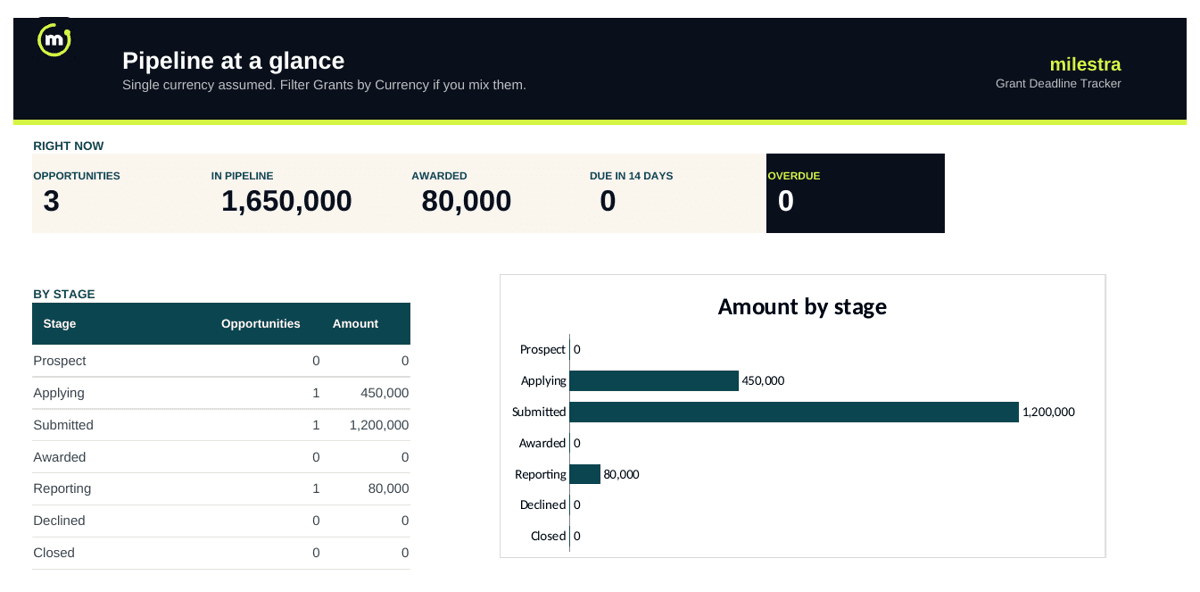
Pipeline dashboard: amounts by stage
Link each grant to the results it pays for
Free · Opens in Excel and Google Sheets · Sent to your inbox
What's inside the template
Sheet
What it does
Start here
Four steps to set it up and a colour key.
Grants
Funder, grant, amount, stage, application deadline, next report due, owner and linked results. Next deadline and days left fill in automatically.
Pipeline
A dashboard: amount in the pipeline, amount awarded, deadlines in the next 14 days, overdue items and a chart by stage.
How to track grants in five steps
List every opportunity. Prospects, live applications and active grants all go in one sheet.
Give each grant an owner. One named person per deadline.
Enter both kinds of deadline. Applications and reports; reporting deadlines are the ones teams miss most.
Review weekly. Sort by days left and move each grant to its current stage.
Link grants to results. Note the results each grant pays for, so reporting is a copy-paste, not a hunt.
Grant stages at a glance
Stage
Meaning
What to do
Prospect
A funder or call worth pursuing
Check eligibility and fit
Applying
Writing the application
Work back from the deadline
Submitted
Waiting for a decision
Note the decision date
Awarded
Funded, reporting not started
Add report due dates
Reporting
Active grant with reports due
Track results and evidence
Declined / Closed
Finished
Record lessons for next time
From spreadsheet to a grant tracker that reminds you
Milestra has a built-in grant tracker: every funder, deadline and report due date, automatic reminders, and each grant linked to the goals and results it pays for, so the report is ready when the deadline arrives. It's free for up to 5 people, and nonprofits get 50% off paid plans.
Frequently asked questions
What is a grant tracker?+
A grant tracker is one list of every funding opportunity your organisation is working on: the funder, the amount, where it stands, and the next deadline, whether that is an application or a report.
What columns should a grant tracking spreadsheet have?+
At minimum: funder, grant or call name, amount, currency, stage, application deadline, next report due date, owner and notes. This template also works out the next deadline and the days left, and lets you link each grant to the results it pays for.
How do I stop missing grant deadlines?+
Keep every deadline in one place, give each grant an owner, and review the tracker weekly. In this template, days left turn amber 14 days before a deadline and red once it has passed.
What do the grant stages mean?+
Prospect: worth pursuing. Applying: writing the application. Submitted: waiting for a decision. Awarded: funded, not yet reporting. Reporting: active grant with reports due. Declined and Closed: finished.
Does it work in Google Sheets?+
Yes. Upload the .xlsx file to Google Drive and open it with Google Sheets. The stage dropdown, formulas and colours carry over.
Can I use it as a grant management spreadsheet?+
Yes, for the tracking side of grant management: the pipeline, every deadline, who owns it and the results each grant pays for. Budgets and spending belong in your accounting system; note the budget code in the notes column so the two can be matched.
Is this a donor database?+
No. It tracks grants from institutional funders such as foundations, government agencies and corporate programmes, not gifts from individual donors. Keep individual donors in a CRM or donor database, and use the donor report template when you report results to a funder.
Is it free?+
Yes. Enter your email and we send it straight to your inbox. You can share it with your fundraising team.