Free logframe template (Excel): the matrix and your indicators in one file
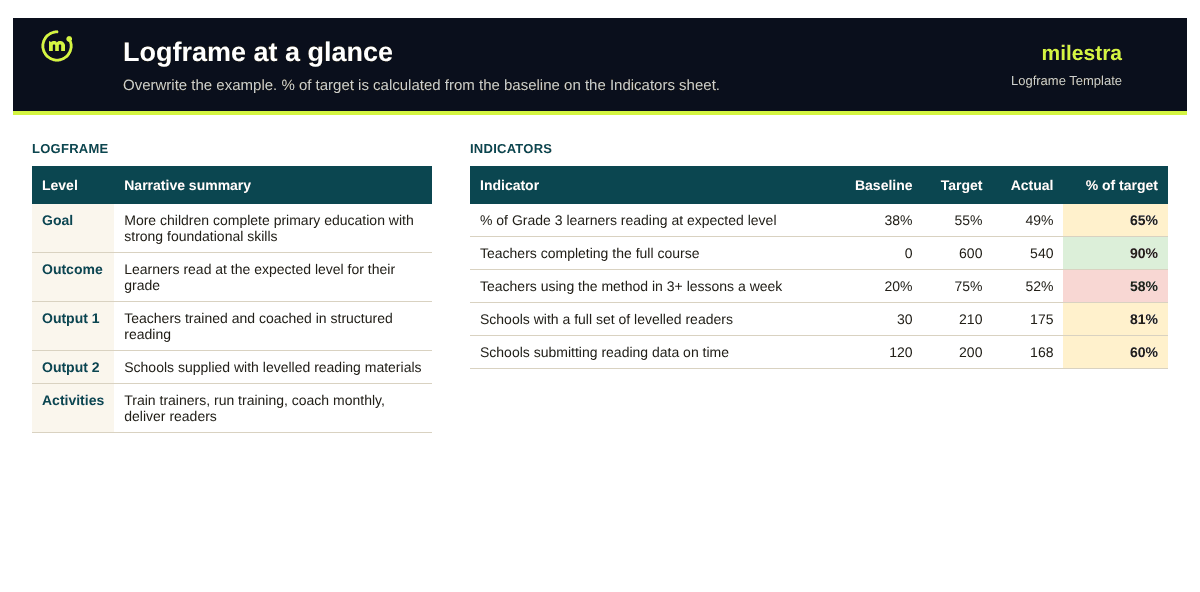
Most funders ask for a logframe, and most teams rebuild one from scratch for every proposal. This free Excel template gives you the four-by-four matrix with a completed example, an indicator sheet that works out progress from the baseline, and short instructions for each step.
Excel · 3 sheets
Logframe template
The logical framework matrix with a worked example, and an indicator sheet that tracks progress from the baseline.
Goal, outcome, outputs and activities in the classic matrix
Indicators, means of verification and assumptions for each level
% of target calculated from the baseline, with status colours
A completed education example to overwrite
Free · Opens in Excel and Google Sheets · Sent to your inbox
What's inside the template
Sheet
What it does
Logframe
The matrix: goal, outcome, outputs and activities, each with indicators, means of verification and assumptions. A completed education example shows the level of detail funders expect.
Indicators
One row per indicator with level, definition, unit, baseline, target, actual, frequency, source and owner. % of target is calculated from the baseline and coloured green, amber or red.
How to use
Step-by-step instructions, in short, and how to read the colours.
How to fill in a logframe in seven steps
Agree the problem and the goal. The goal is the long-term change you contribute to, not something you achieve alone.
Define one to three outcomes. The change the programme is accountable for by the end.
List the outputs. What must exist for each outcome to happen: people trained, services running, materials delivered.
Plan the main activities. The work under each output. The detailed work plan sits elsewhere.
Add indicators. Two or three per level, each with a unit, baseline, target and frequency.
Name the evidence. A means of verification for every indicator. If you cannot name a source, the indicator is not ready.
Write the assumptions, then test the logic. If we do these activities and the assumptions hold, do we deliver the outputs? Work up the matrix the same way.
The four levels at a glance
Level
Answers
Example indicator
Goal (impact)
What long-term change do we contribute to?
Primary completion rate in programme districts
Outcome
What will be different by the end of the programme?
% of Grade 3 learners reading at the expected level
Outputs
What will the programme deliver?
# of teachers completing the full course
Activities
What will we do?
Budget and spend by activity
From logframe to results you can report any day
Milestra holds your logframe indicators with owners, baselines and targets, collects short weekly updates and evidence, and builds a logframe-style donor report from the live numbers. It's free for up to 5 people, and nonprofits get 50% off paid plans.
Frequently asked questions
What is a logframe?+
A logframe (logical framework) is a one-page matrix that links a programme's goal, outcomes, outputs and activities to indicators, means of verification and assumptions. Most institutional funders ask for one.
What is the difference between a logframe and a theory of change?+
A theory of change explains why and how change is expected to happen, usually as a diagram with a narrative. A logframe commits one programme to specific results and indicators in a table, often built from part of the theory of change.
How many indicators should a logframe have?+
Two or three per level is a good rule. For one outcome and three outputs, that is roughly eight to twelve indicators. Every indicator costs time to collect.
How is % of target calculated?+
From the baseline: (actual − baseline) ÷ (target − baseline). If reading levels moved from 38% to 49% against a target of 55%, that is 11 of the planned 17 points, or 65%.
My funder uses different words. Does the template still work?+
Yes. Funders use "impact", "goal" or "overall objective" for the top row, and "outcome", "purpose" or "specific objective" for the second. Rename the levels to match your funder's terms.
Does it work in Google Sheets?+
Yes. Upload the .xlsx file to Google Drive and open it with Google Sheets. The formulas, dropdowns and colours carry over.
Is it free?+
Yes. Enter your email and we send it straight to your inbox. You can share it with your programme and M&E team.