Free donor database template (Excel): every supporter and gift in one place
Most small fundraising teams keep supporters in one spreadsheet, gifts in another and consent in someone's inbox. This free Excel donor database puts them together: one row per supporter, one row per gift, consent to contact recorded for everyone, and a dashboard that shows income, retention and who has lapsed.
Excel · 4 sheets
Donor database template
Every supporter and gift in one place, with consent recorded and a dashboard that shows who to thank and who has lapsed.
Last gift, total given and status worked out for every donor
Consent to contact recorded for each supporter
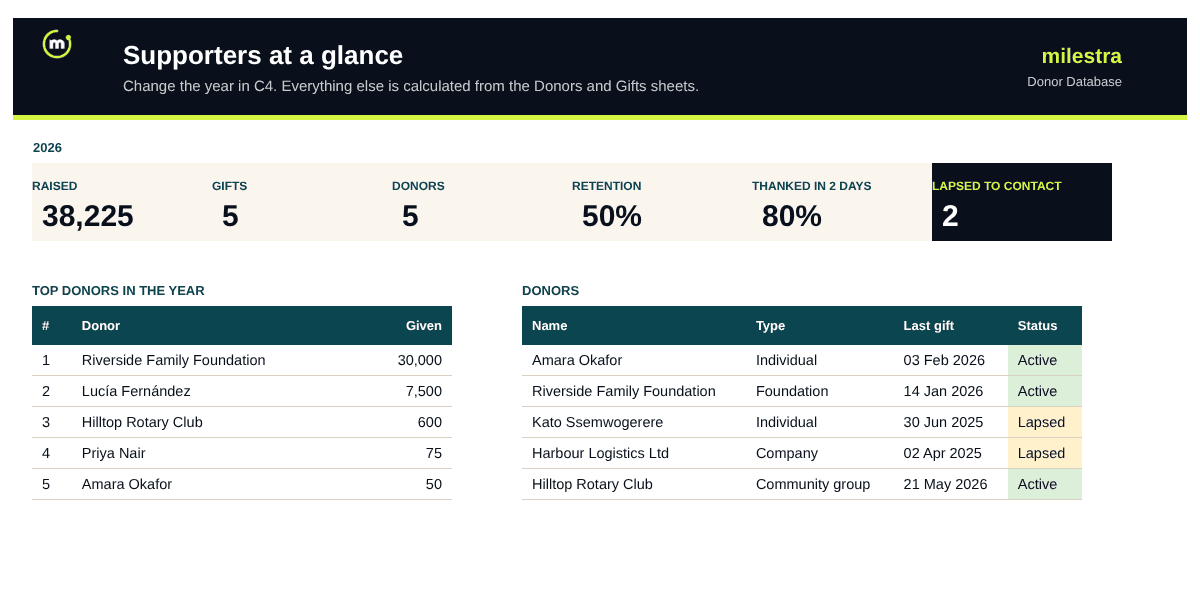
Dashboard: income, retention and top 10 donors by year
Days to thank tracked for every gift
Free · Opens in Excel and Google Sheets · Sent to your inbox
What's inside the template
Sheet
What it does
Start here
Six setup steps, a status key and a short data protection checklist.
Donors
One row per supporter: type, contact details, consent to contact, how and when they agreed, preferred channel and owner. First gift, last gift, total given and status fill in automatically.
Gifts
One row per gift: date, donor ID, amount, campaign, restricted or unrestricted, fund, payment method, receipt and thank-you date. The donor's name and days to thank fill in.
Dashboard
Pick a year to see income, change on the year before, average gift, donor retention, unrestricted share, thank-you speed, lapsed donors to contact and the top 10 donors.
How to set up a donor database in Excel in five steps
Give every supporter one ID. D001, D002 and so on. The ID links each gift to the right person, even when two people share a name.
Record consent before anything else. Note whether each supporter agreed to be contacted, when, how, and on which channel.
Log every gift as its own row. Totals, first and last gift and status come from the Gifts sheet, so never type them by hand.
Thank within 48 hours. Enter the date you thanked each donor; the dashboard shows how many gifts were thanked within two days.
Review lapsed donors monthly. Sort by status and contact lapsed supporters who agreed to hear from you, before they become lost.
Donor status at a glance
Status
Meaning
What to do
Prospect
In the database, no gift yet
Introduce your work and invite a first gift
Active
Gave in the last 12 months
Thank, report back and ask again at the right time
Lapsed
Last gift 12 to 24 months ago
Personal contact: share a result and invite them back
Lost
No gift for more than 24 months
Check consent; contact once, or archive
From a donor list to reports that show what gifts achieved
Milestra is not a donor CRM. It tracks your funders and grants, links each one to the goals and results it pays for, and builds donor and board reports from live numbers, so supporters see what their money achieved. It's free for up to 5 people, and nonprofits get 50% off paid plans.
Frequently asked questions
What is a donor database?+
A donor database is one place that holds every supporter, every gift they have made and how they want to be contacted. It lets you thank people quickly, see who has stopped giving and report income accurately.
What should a donor database record?+
For each supporter: a unique ID, name, type, contact details, consent to contact with date and source, preferred channel and an owner. For each gift: date, donor ID, amount, campaign, whether it is restricted, payment method and when you said thank you.
Is Excel good enough for a donor database?+
For a few hundred supporters and one or two people updating it, yes. Move to a donor CRM when several people edit at once, online donations need to flow in automatically, or you run regular mailings and tax reclaims such as Gift Aid.
How should we record consent?+
Record whether the person agreed to be contacted, the date, how they agreed (form, event, conversation) and the channel. Check the rules that apply to you, such as GDPR in Europe, and remove people who ask to be forgotten.
How is donor retention calculated?+
Donors who gave in both the selected year and the year before, divided by donors who gave the year before. The dashboard works it out for any year you choose.
Does it work in Google Sheets?+
Yes. Upload the .xlsx file to Google Drive and open it with Google Sheets. It also works in Excel 2019, Excel 2021 and Microsoft 365; in Excel 2016 the first and last gift columns need newer functions.
Is it free?+
Yes. Enter your email and we send it straight to your inbox. You can share it with your fundraising team.