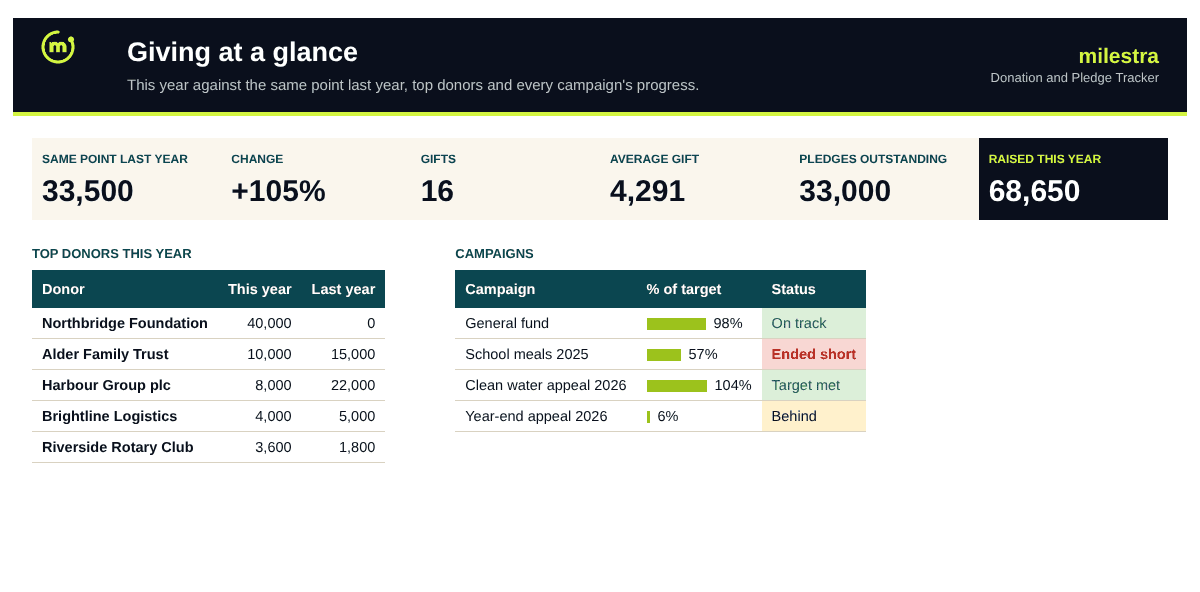
Free donation and pledge tracker: every gift, donor and campaign in one file
Small fundraising teams lose track in the same places: who gave last year but not this year, which pledges are behind, and which gifts were never thanked. Log each gift once here and the donor totals, pledge balances, campaign progress and thank-you reminders follow.
Excel · 7 sheets
Donation and pledge tracker
Gifts, donors, pledges and campaigns, with thank-you alerts and this year against last year.
This year against the same point last year
Pledge balances from linked payments
Donor status: new, active, lapsed
Red flags on gifts not yet thanked
Free · Opens in Excel and Google Sheets · Sent to your inbox
What's inside
Sheet
What it does
Dashboard
Raised this year against the same point last year, month by month, by payment method, top donors, campaigns and donor status.
Donations
Date, donor ID, amount, campaign, method, fund, pledge ID, receipt and thank-you date; donor name and alerts are calculated.
Donors
One row per donor; first, last and total giving, this year, last year and status are calculated.
Pledges
Promised gifts with paid, balance, % paid and status from the payments linked to them.
Campaigns
Each appeal's dates and target; raised, pledges outstanding, average gift and on-track status are calculated.
Settings
Year, currency, thank-you limit, lapsed period and payment methods.
Start here
How to set it up and keep it clean.
How to use it well
Give every donor an ID. Names get spelt three ways; IDs don't. The donor's name appears on each gift when the ID matches.
Log each gift once, on the day. Date, donor, amount, campaign and method. Everything else is worked out from it.
Link pledge payments. Put the pledge ID on each payment and the balance and status update themselves.
Thank within two days. Fill in 'Thanked on' as you go. Gifts past your limit turn red.
Call 'Not yet this year' donors. People who gave last year are the easiest gifts to win back, especially before year-end.
Compare like with like. The dashboard compares this year with the same date last year, so a slow month isn't mistaken for a bad year.
Skip the spreadsheet
Show donors what their gifts achieved
In Milestra, gifts and grants sit next to the goals they fund, so donor updates show real progress. Reminders go to the right person and reports build themselves from live results. Free for up to 5 people, and nonprofits get 50% off paid plans.
New this year: first gift this year. Active: gave before and has given this year. Not yet this year: gave before but not yet this year. Lapsed: no gift for 18 months (you can change the period). No gifts yet: on the list but nothing logged.
How do pledges work?+
Add the promise on Pledges with an amount and due date. Each payment is logged as a normal gift with the pledge ID, so it counts in this year's income and reduces the balance. Pledges are Paid, Open, Due soon (30 days) or Overdue.
Is it a donor database?+
It is a light one for teams with up to 300 donors and 1,000 gifts a year. Keep personal data to what you need, and store the file where only the people who use it can open it.
Can I use more than one currency?+
Use one currency throughout so totals add up. Convert foreign gifts on the day they arrive and note the original amount in Notes.
How is 'same point last year' worked out?+
Everything given last year up to today's date last year, so the comparison is fair at any point in the year.
Does it work in Google Sheets?+
Yes. Upload the .xlsx file to Google Drive and open it with Google Sheets. Formulas, dropdowns, colours and progress bars carry over. It also works in Excel 2019 or later and Microsoft 365.
Is it really free?+
Yes. Enter your email and we send the file straight to your inbox. Use it and share it inside your organisation as often as you like.