Free grant pipeline tracker: from prospect to award, with a forecast you can trust
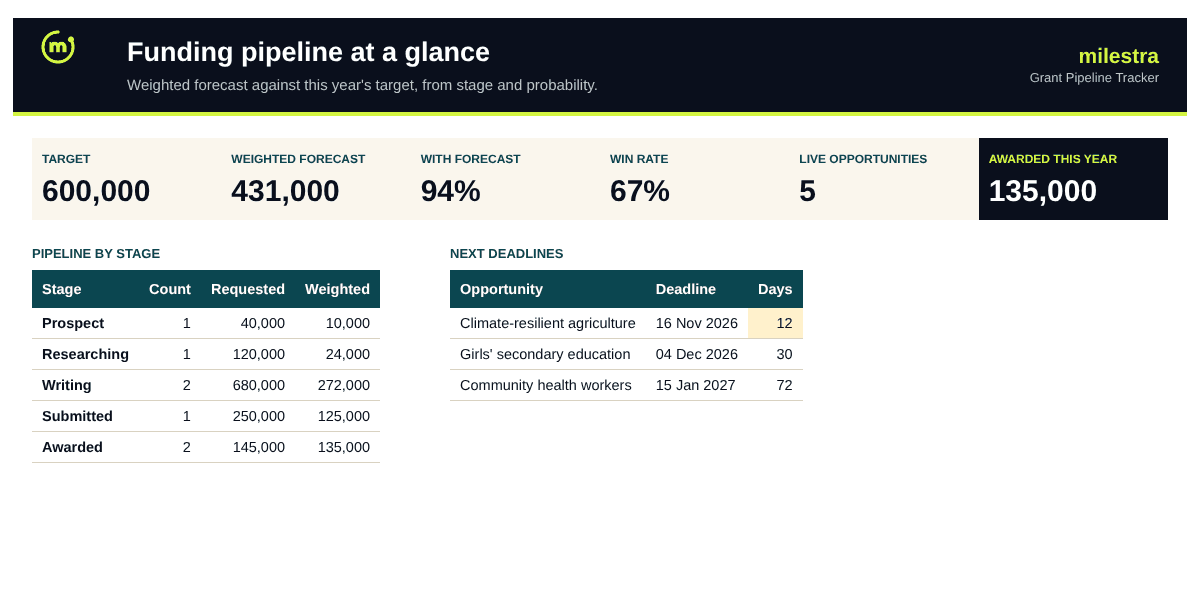
A list of deadlines tells you what is due. A pipeline tells you whether you will hit your target. This tracker gives every opportunity a stage and a probability, works out the weighted forecast against your target for the year, and flags deadlines and next steps before they slip.
Excel · 4 sheets
Grant pipeline tracker
Every funding opportunity from prospect to award, with a weighted forecast against your target and alerts before deadlines slip.
Weighted forecast from stage and probability
Awarded plus forecast against this year's target
Win rate overall and by funder type
Next deadlines and overdue next steps flagged
Free · Opens in Excel and Google Sheets · Sent to your inbox
What's inside
Sheet
What it does
Dashboard
Awarded this year, target, weighted forecast, win rate, pipeline by stage and funder type, and the next eight deadlines.
Pipeline
One row per opportunity: funder, type, programme, owner, stage, amounts, deadline, decision and next step. Probability, weighted value, days to deadline and alerts are calculated.
Settings
The year, your target and currency, and the probability given to each stage.
Start here
How to set it up and keep it current.
How to use it well
Set your target and stage probabilities. Start with the defaults, then use your own win rates once you have a year of decisions.
Add every opportunity, however early. A prospect with a 10% chance still belongs in the pipeline; it just counts for less.
Move the stage as you work. Prospect, researching, writing, submitted, then awarded or declined.
Keep one next step and date on every live row. The tracker flags any that pass without being done.
Record every decision. Awards with the amount and date, declines with a reason in Notes. Your win rate depends on it.
Review weekly. Check the forecast against target, then the next deadlines and overdue steps.
Skip the spreadsheet
Let your pipeline remind you
Milestra's fundraising pipeline reminds the owner 14, 7 and 1 days before each deadline, drafts proposals from your live results and links every award to the goals it pays for. Free for up to 5 people, and nonprofits get 50% off paid plans.
Each opportunity's amount multiplied by its chance of success. A 250,000 application at the submitted stage (50%) counts as 125,000. Added up, it is a far better guide to next year's income than the total you have asked for.
Where do the probabilities come from?+
The defaults are common starting points: 10% for a prospect up to 50% once submitted. Replace them with your own win rates when you have them, or type a probability for one opportunity in the Override column.
How is the win rate calculated?+
Awards divided by all decisions (awards plus declines). Opportunities still waiting for a decision are left out, so the rate isn't flattered or dragged down by them.
How is this different from the grant deadline tracker?+
The deadline tracker keeps every application and report date in view for grants you already work with. The pipeline tracker is for winning new funding: stages, probability and forecast against your target. Many teams use both.
Can I track individual major donors here too?+
Yes. Set the funder type to Major donor. For a full donor list with gifts and consent, use the donor database template.
Does it work in Google Sheets?+
Yes. Upload the .xlsx file to Google Drive and open it with Google Sheets. Formulas, dropdowns, colours and progress bars carry over. It also works in Excel 2019 or later and Microsoft 365.
Is it really free?+
Yes. Enter your email and we send the file straight to your inbox. Use it and share it inside your organisation as often as you like.