Free 12-month grant calendar: every application, report and renewal on one page
Missed deadlines rarely come from forgetting the date. They come from starting too late. This calendar puts every application, donor report, renewal and board approval on a 12-month view, works out when you need to start each one, and flags what is overdue or due soon.
Excel · 4 sheets
12-month grant calendar
Applications, reports and renewals on a 12-month view, with start-by dates and alerts.
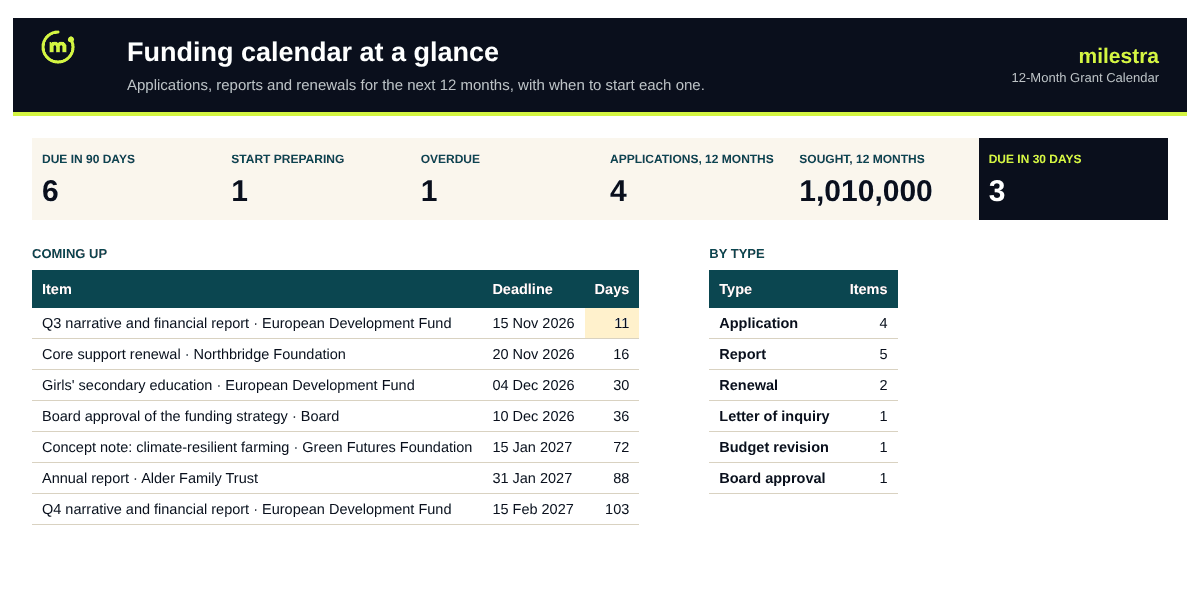
12 months on one printable page
Start-by date from your prep time
Due-soon, start-now and overdue alerts
Colour by type: application, report, renewal
Free · Opens in Excel and Google Sheets · Sent to your inbox
What's inside
Sheet
What it does
Dashboard
Due in 30 and 90 days, items to start now, overdue items, what's sought in the next 12 months, the next deadlines and a count by type.
Calendar
Twelve months from the month you choose, with each deadline in its month, coloured by type.
Deadlines
Item, funder, type, deadline, prep weeks, owner, amount and status; start-by date, days left and alert are calculated.
Start here
How to fill it in and run it at a monthly fundraising meeting.
How to use it well
Add every date, not just applications. Donor reports, renewals, budget revisions and board approvals miss deadlines just as often.
Set prep weeks honestly. Eight weeks for a large application, three for a report. The start-by date is worked out from them.
Give each item one owner. The person who will send it, not the team.
Choose the calendar's first month. Usually this month. The calendar shows the next twelve.
Move status forward. Planned, Preparing, Submitted. Planned items past their start-by date are flagged 'Start preparing'.
Review it monthly. Start with what is overdue, then what is due in 30 days, then what needs to start.
Skip the spreadsheet
Get reminders before every funder deadline
Milestra reminds the owner 14, 7 and 1 days before each deadline, drafts reports from your live results, and links every grant to the goals it pays for. Free for up to 5 people, and nonprofits get 50% off paid plans.
The deadline minus the prep weeks you enter. When today passes that date and the item is still Planned, it is flagged 'Start preparing'.
What do the alerts mean?+
'Due in n days' (amber) when a live item is 14 days away or less, 'Overdue' (red) when the deadline has passed and it isn't submitted, and 'Start preparing' when the start-by date has passed.
How many items fit in each month?+
Eight per month on the calendar view, which suits most organisations. The Deadlines sheet holds 400 items; anything beyond eight in a month still shows on the dashboard and list.
Can I print it?+
Yes. Every sheet is set to print landscape and one page wide, ready for a wall or a board pack.
How is this different from the grant pipeline tracker?+
The pipeline tracks the chances and value of each opportunity. The calendar tracks every date you owe a funder, including reports on grants you already have. Many teams use both.
Does it work in Google Sheets?+
Yes. Upload the .xlsx file to Google Drive and open it with Google Sheets. Formulas, dropdowns, colours and progress bars carry over. It also works in Excel 2019 or later and Microsoft 365.
Is it really free?+
Yes. Enter your email and we send the file straight to your inbox. Use it and share it inside your organisation as often as you like.