Free OKR and KPI tracker: objectives, key results and KPIs in one file
Most OKR spreadsheets stop at a list of goals. This one runs the rhythm: owners log a value and their confidence each week, and progress, status and the dashboard update themselves. Monthly KPIs sit alongside, so the measures you track every month and the results you are changing this year are in one place.
Excel · 6 sheets
OKR and KPI tracker
Objectives, key results and weekly check-ins, with monthly KPIs and a dashboard that scores everything for you.
Progress from baseline, latest value and confidence for every key result
Status: On track, At risk, Off track, Needs update
Monthly KPIs against target with green, amber, red
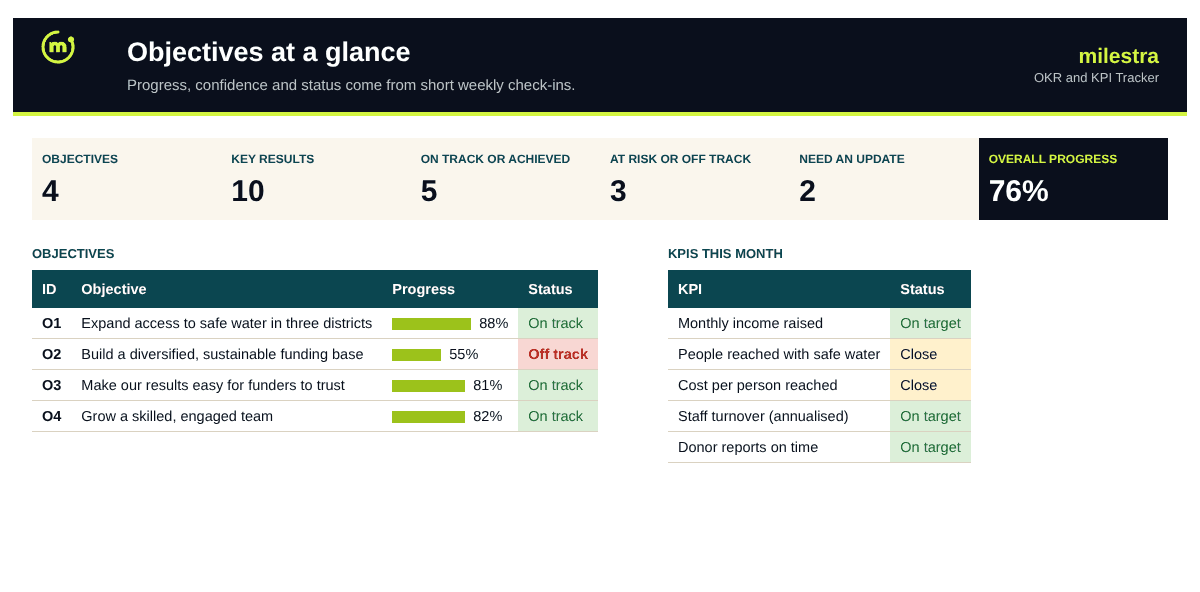
Dashboard with progress bars for every objective
Free · Opens in Excel and Google Sheets · Sent to your inbox
What's inside
Sheet
What it does
Dashboard
Overall progress, status counts, every objective's progress bar and your KPIs at a glance.
Objectives
Three to five objectives with owner, team, period and dates; progress, time elapsed and status are calculated.
Key results
Baseline, target, unit and due date; the latest value, progress, confidence, days since update and status fill in from Check-ins.
Check-ins
One line per key result per week: the date, the latest value and High, Medium or Low confidence.
KPIs
Twelve months of values per KPI with a target and direction; latest value, % of target and status calculated.
Start here
Six steps to set it up and run it, and what each colour means.
How to use it well
Write three to five objectives. Qualitative and motivating: what will be different by the end of the period.
Add two to four key results to each. Each with a baseline, a target and a unit, so progress can be measured rather than argued.
Give every key result one owner. One name, not a team. Owners log the check-ins.
Check in every week. The latest value and a confidence level take a minute. A key result with no check-in for 14 days is flagged.
Track your KPIs monthly. Income, reach, cost per result: the measures you keep healthy all year.
Review the dashboard together. Spend the meeting on what is at risk or off track, not on reading numbers aloud.
Skip the spreadsheet
Run your OKRs without chasing updates
Milestra asks each owner for their weekly check-in by email (SMS and WhatsApp coming soon), keeps evidence with every result, escalates what's slipping and builds your board report from the live numbers. Free for up to 5 people, and nonprofits get 50% off paid plans.
A KPI is a measure you watch all the time to keep something healthy, like monthly income or cost per person reached. An OKR is a time-bound push to change something: an objective with two to four key results you aim to move this quarter or year. Most organisations need both, which is why this tracker has both.
How is progress calculated?+
From the baseline: (latest value − baseline) ÷ (target − baseline), capped between 0% and 100%. A key result that moves from 1,200 to 3,480 households against a target of 4,000 is 81% of the way there.
How is status decided?+
Achieved at 100%. Otherwise the owner's latest confidence sets it: High is On track, Medium is At risk, Low is Off track. If there has been no check-in for 14 days it shows Needs update, because an old number is not a status.
How many objectives should we have?+
Three to five for the organisation, each with two to four key results. More than that and nobody can say what matters most.
Can I use it for teams as well as the whole organisation?+
Yes. Use the Team column on Objectives, or keep one copy per team and a summary copy for leadership.
Does it work in Google Sheets?+
Yes. Upload the .xlsx file to Google Drive and open it with Google Sheets. Formulas, dropdowns, colours and progress bars carry over. It also works in Excel 2019 or later and Microsoft 365.
Is it really free?+
Yes. Enter your email and we send the file straight to your inbox. Use it and share it inside your organisation as often as you like.