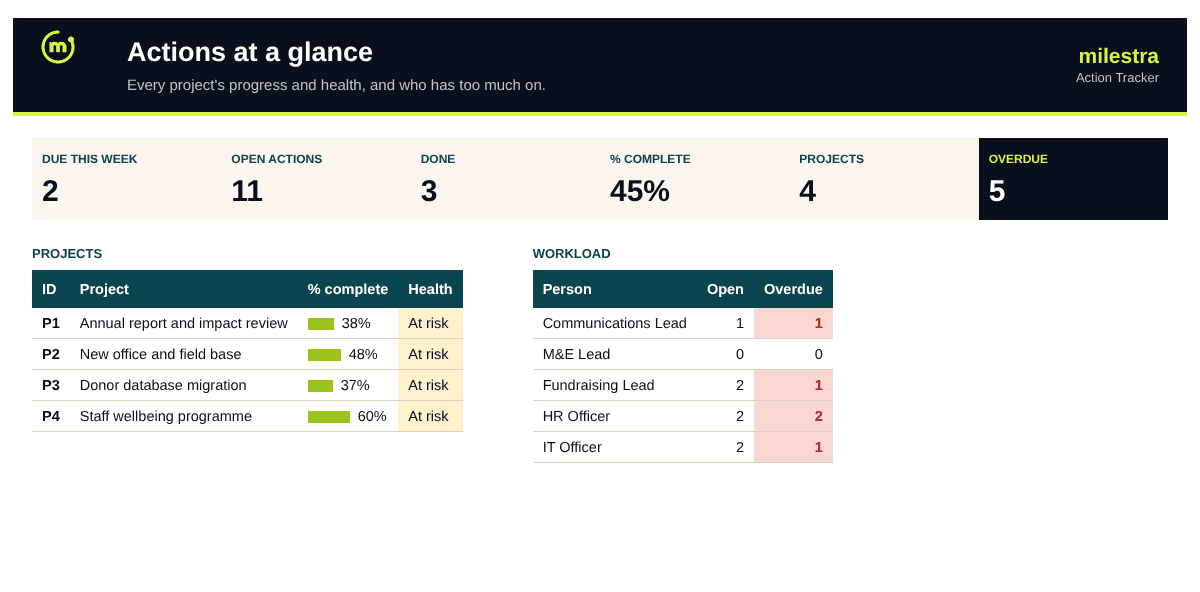
Free multi-project action tracker: every action, owner and deadline in one list
Actions agreed in meetings disappear into notebooks and inboxes. This tracker puts every action from every project in one list, with one owner and one due date each, flags what is overdue or due this week, and shows each project's health and who has too much on.
Excel · 5 sheets
Multi-project action tracker
Every action across your projects with owners and due dates, plus project health and each person's workload.
Overdue and due-this-week flags on every action
Each project's % complete and health
Workload by person: open and overdue
Owner and project dropdowns keep it tidy
Free · Opens in Excel and Google Sheets · Sent to your inbox
What's inside
Sheet
What it does
Dashboard
Overdue, due this week, open and done; every project's progress and health; each person's open and overdue actions.
Projects
Project ID, name, lead and dates; actions, done, overdue, % complete and health are calculated.
Actions
Project, action, owner, priority, dates, status and % complete; days overdue, flags and project name are calculated.
People
Everyone who owns actions, with open, overdue, due this week and done counts.
Start here
How to set it up and run it in a weekly meeting.
How to use it well
List the people and projects first. They become the dropdowns, which keeps names and IDs consistent.
Write actions as outcomes. 'Lease signed' beats 'look into office options'. Start with a verb and make done obvious.
One owner per action. Shared actions are nobody's actions.
Add a due date to everything. Without a date, an action can't be overdue, so it never gets attention.
Update status before the meeting. Owners update their own rows; the meeting is for decisions, not data entry.
Start the meeting with what's overdue. Then the week ahead, then anyone whose workload is too high.
Skip the spreadsheet
Tie every action to a result
In Milestra each action sits under the goal it moves. Owners get reminders before things slip, overdue work escalates to the right manager, and progress rolls up to your dashboard and board report. Free for up to 5 people, and nonprofits get 50% off paid plans.
Complete when every action is done. Off track with three or more overdue actions or once the project's end date has passed. At risk with one or two overdue actions. Otherwise on track.
What counts as overdue?+
Any action not marked Done or Cancelled whose due date has passed. Actions due in the next seven days are flagged as Due this week.
How is % complete calculated?+
The average of each action's % complete in the project, with Done counted as 100% and cancelled actions left out.
How many projects and actions can it hold?+
Thirty projects, forty people and 1,500 actions. Archive completed projects to a copy of the file once a year to keep it fast.
Can I use it for meeting action points?+
Yes. Make each regular meeting a 'project', for example 'Senior team meeting', and log its action points there.
Does it work in Google Sheets?+
Yes. Upload the .xlsx file to Google Drive and open it with Google Sheets. Formulas, dropdowns, colours and progress bars carry over. It also works in Excel 2019 or later and Microsoft 365.
Is it really free?+
Yes. Enter your email and we send the file straight to your inbox. Use it and share it inside your organisation as often as you like.