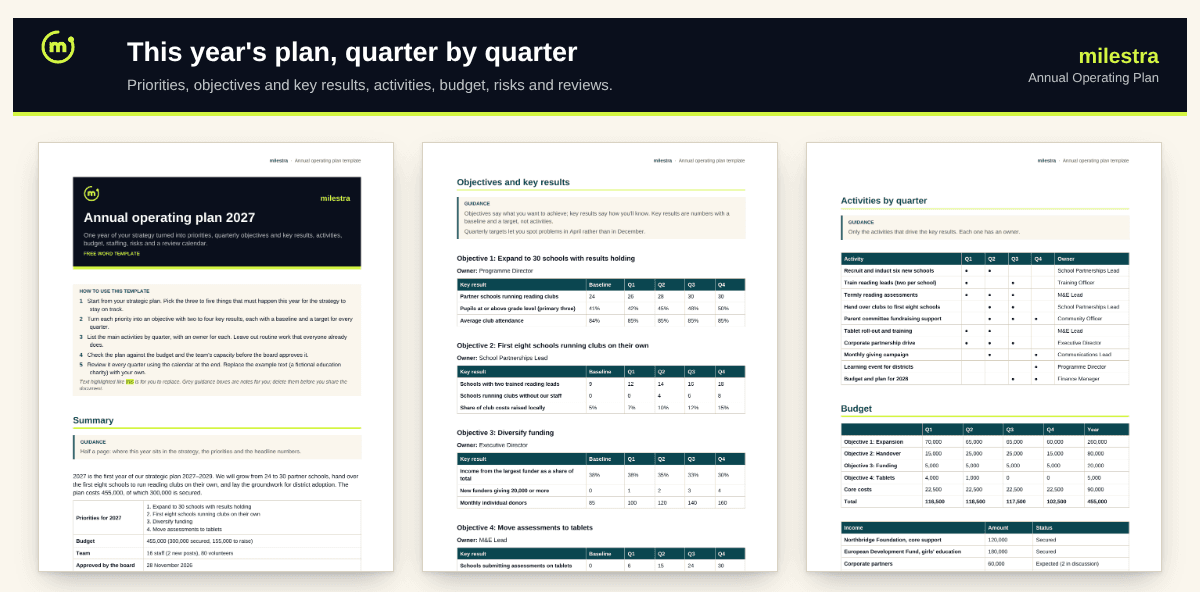
Free annual operating plan template: this year's strategy, quarter by quarter
A strategic plan says where you're going; the annual plan says what happens this year and who does it. This template turns your strategy into priorities, objectives and key results with quarterly targets, the activities that drive them, a budget by quarter, staffing changes, risks with early warning signs and a review calendar.
Word · 4 pages
Annual operating plan template
Priorities, quarterly objectives and key results, activities, budget, team, risks and reviews.
Objectives with quarterly key-result targets
Activities by quarter with owners
Budget by quarter and income status
Risks with early warning signs
Free · Opens in Word and Google Docs · Sent to your inbox
What's inside
Section
What it does
Summary
Where the year sits in the strategy, priorities, budget and team.
Objectives and key results
Four objectives, each with key results that have a baseline and a target for every quarter.
Activities by quarter
The work that drives the key results, with an owner for each.
Budget and team
Cost by objective and quarter, income by status, and staffing changes.
Risks and review calendar
Each risk with an early warning sign and response; weekly, monthly and quarterly reviews.
How to use it well
Pick three to five priorities. The things that must happen this year for the strategy to stay on track.
Turn each into an objective. With two to four key results that are numbers, not activities.
Set quarterly targets. They let you spot a problem in April instead of December.
List only the activities that matter. Leave out routine work everyone already does.
Check it against budget and capacity. Before the board approves it, not after.
Put the reviews in the diary. The plan is only as good as the quarterly conversations about it.
Skip the spreadsheet
Run this plan in Milestra
Milestra turns each objective into key results with owners and quarterly targets. Weekly check-ins take a minute, progress rolls up to one dashboard, and the board report writes itself. Free for up to 5 people, and nonprofits get 50% off paid plans.
How is an annual plan different from a strategic plan?+
The strategic plan covers three to five years and sets direction. The annual plan covers one year and sets who does what, when and with what money.
Do we have to use OKRs?+
No, but the format helps: an objective says what you want, key results say how you'll know. If you already use goals and indicators, put them in the same tables.
How many objectives should we have?+
Three to five for the whole organisation. Teams can have their own, linked to these.
When should we write it?+
Two to three months before the year starts, alongside the budget, so the board approves both together.
Is the example real?+
No. It's a fictional education charity, so you can see a complete plan. Replace it with your own.
Does it work in Google Docs?+
Yes. Upload the .docx file to Google Drive and open it with Google Docs. Headings, tables and highlighting carry over. It also opens in Microsoft Word 2016 or later and LibreOffice.
Is it really free?+
Yes. Enter your email and we send the file straight to your inbox. Use it and share it inside your organisation as often as you like.