Free volunteer and member tracker: hours, value, renewals and checks in one file
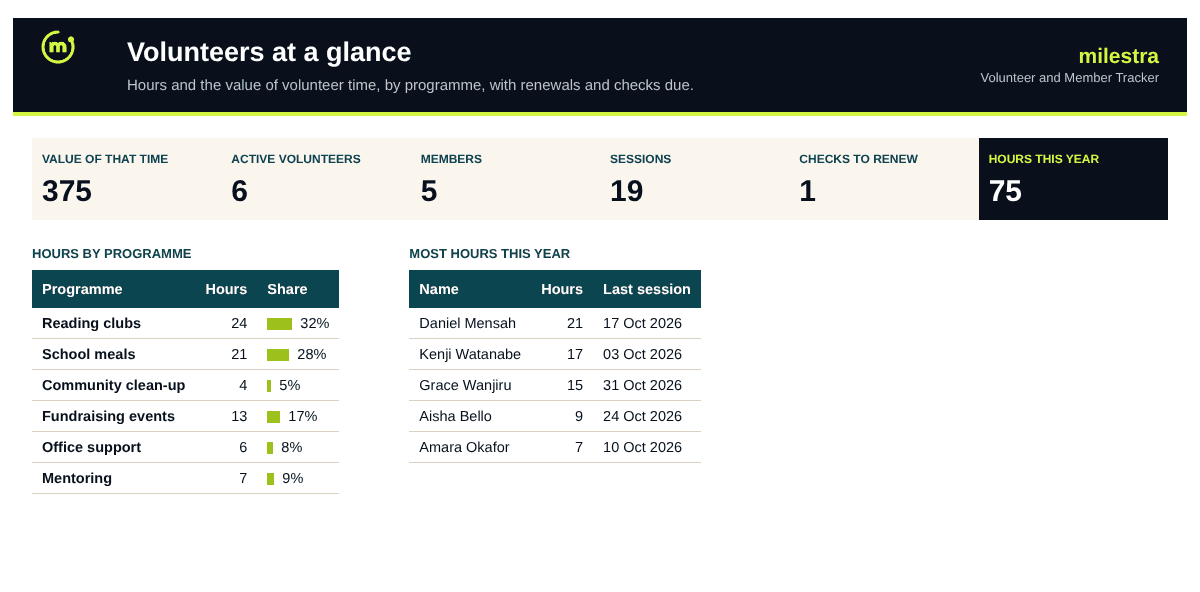
Volunteer time is often your largest in-kind contribution, and the hardest to report. This tracker keeps volunteers and members in one list, logs hours by programme, puts a value on that time, and flags expired background checks, membership renewals and people who have gone quiet.
Excel · 5 sheets
Volunteer and member tracker
Volunteers and members in one list, hours by programme, the value of their time and renewal alerts.
Hours by programme and month
Value of volunteer time for reports
Background-check and renewal alerts
Flags volunteers with no hours in 90 days
Free · Opens in Excel and Google Sheets · Sent to your inbox
What's inside
Sheet
What it does
Dashboard
Hours and their value this year, active volunteers and members, checks and renewals due, hours by month and programme, and the most active volunteers.
People
One row per volunteer or member, with check expiry, hours all time and this year, last session and alerts calculated.
Hours
One row per session: date, person ID, programme, task and hours.
Settings
Year, value of one hour, how long a check lasts, renewal warning and programmes.
Start here
How to set it up and use it for reports.
How to use it well
Set a fair hourly value. Use a local wage for similar work, or the rate your funders accept for in-kind contributions.
Add people once. Each person gets an ID. Hours are logged against the ID, so names never need retyping.
Log hours after every session. A sign-in sheet copied in weekly is enough. Monthly is too late to remember.
Record background checks. Add the date of each check. The sheet works out when it expires and warns you 30 days ahead.
Call people who go quiet. Anyone active with no hours in 90 days is flagged. A friendly call brings many back.
Use it in your annual report. Hours by programme and the value of volunteer time are ready to quote.
Skip the spreadsheet
Show what your volunteers make possible
In Milestra, volunteer hours sit next to the goals they help you reach, so annual reports and funder updates show the full picture without anyone adding up spreadsheets. Free for up to 5 people, and nonprofits get 50% off paid plans.
Hours multiplied by the hourly value you set on Settings. Many funders accept it as an in-kind contribution; check what rate your funders use.
What do the alerts mean?+
'Check expired' and 'Renewal overdue' are red. 'Check due' (within 30 days), 'Renewal due' (within your warning period) and 'No hours in 90 days' are amber. People marked Left get no alerts.
Can I track members who don't volunteer?+
Yes. Set Role to Member. Members get renewal alerts but no background-check or inactivity alerts.
How many people and sessions can it hold?+
400 people and 2,000 sessions. Start a new file each year if you log more, and keep People in both.
Should I keep personal data here?+
Keep only what you need to contact and support volunteers. Store the file where only the coordinators can open it, and remove people who leave after your retention period.
Does it work in Google Sheets?+
Yes. Upload the .xlsx file to Google Drive and open it with Google Sheets. Formulas, dropdowns, colours and progress bars carry over. It also works in Excel 2019 or later and Microsoft 365.
Is it really free?+
Yes. Enter your email and we send the file straight to your inbox. Use it and share it inside your organisation as often as you like.